Exporting Telemetry to CSV: Analyze Your Kart Data Anywhere
Your kart data doesn't have to live inside one program. How to export telemetry to CSV, what's inside the file, and a free starter spreadsheet to paste into.
Your data shouldn't be a prisoner of one program. Every analysis package can set it free, and almost nobody uses the door.
Export telemetry CSV files and the laps you drove become plain numbers in a plain text file. Numbers a spreadsheet can chew on, a season can accumulate, and no software licence can hold hostage. Some of my most useful karting analysis ever happened in a humble Google Sheet, not in any racing program.
Here's how the export works, what's inside the file, and a ready-made spreadsheet to paste into.
Why bother, when the software has charts
Three reasons, in rising order of importance.
Custom questions. Analysis packages answer their own menu; a spreadsheet answers yours. Consistency spreads, fixed-point exit speeds, season trends, none of which come standard. Sharing. A CSV opens for your tuner, your coach and your dad without anyone installing anything. And ownership. Software comes and goes, file formats get retired, but a folder of CSVs is yours forever.
I've changed logger brands more than once across my career, and the only data that made every move with me was the boring text files nobody can discontinue.
The deeper analysis still happens in the proper tools, the routine from how to analyze kart racing data. The spreadsheet is for the questions those tools don't ask.
How to export telemetry CSV from kart software
Every mainstream package does this, whether it's Race Studio, Alfano's software or Unipro's, and the recipe barely changes.
Open the session, pick the laps worth keeping, find Export or Save As in the file menu, and choose CSV. You'll usually get asked two things: which channels to include, and whether samples should be spaced by time or by distance. Take distance if the option exists, because distance-based rows line up between laps, which is what makes comparisons possible later.
One habit while you're there: export the whole session, not just the glory lap. The slow laps carry the consistency story, and the out lap occasionally explains the whole afternoon.
Keep the channel list short on purpose. Speed, RPM, water temp, EGT and the G channels cover nearly every spreadsheet question, and a lean file opens fast a season from now.
What's actually inside the file
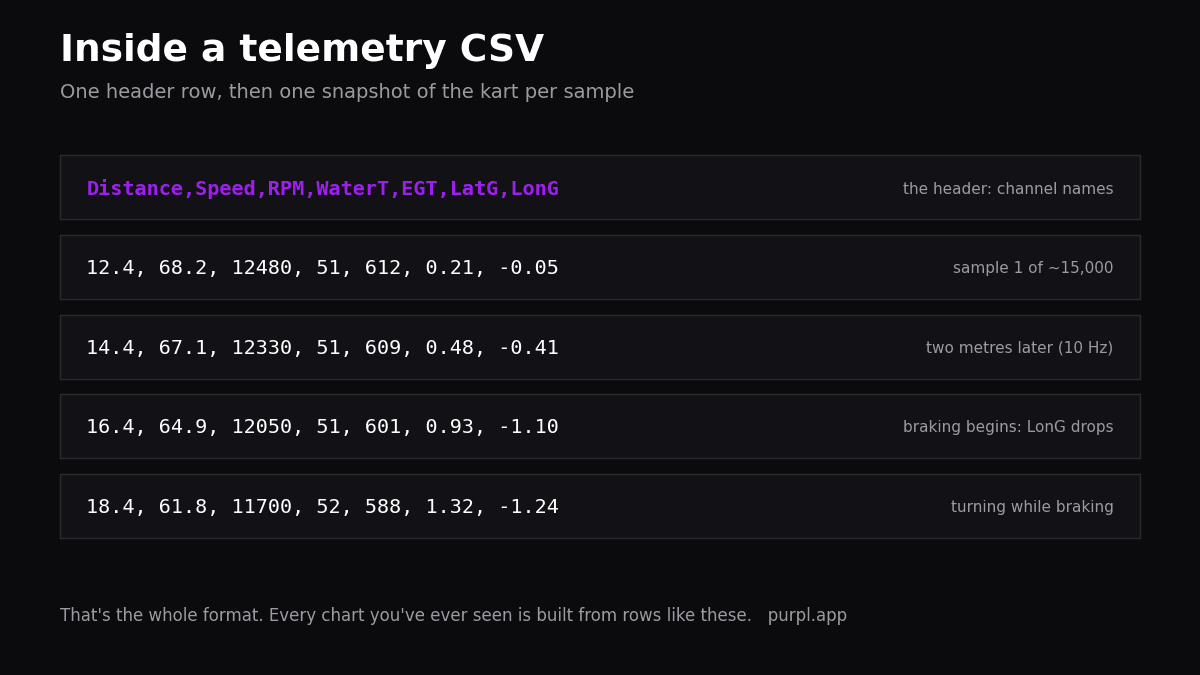
Don't be scared of the word "file format" here. CSV stands for comma-separated values, and it means exactly that: numbers with commas between them, the least mysterious format computing ever produced. That's it. That's the whole trick.
Open one in a text editor once, just to demystify it. A header row naming the channels. Then one row per sample, ten or twenty-five per second depending on your logger, each row a snapshot: distance, speed, RPM, temperatures, G.
That's the entire format. A 12-minute session is maybe fifteen thousand rows, which sounds like a lot and is nothing to a spreadsheet. Every chart your analysis software draws is built from exactly this table, and now you can build your own.
The session sheet: my favourite spreadsheet trick
The most valuable spreadsheet in karting doesn't hold samples at all. It holds one row per session, and I learned it tracking parameters the long way.
Average tyre temps, average hot pressures, average water temperature across the fastest lap. EGT minimum and maximum logged separately, because they describe the bottom and top of the carburetion independently. RPM minimum and maximum, plus metres spent on the limiter. Then colour-code each cell against its operating window: green inside, red running hot, blue running cold.
One glance at the colours tells you which parameter left its window before the tent starts arguing. Numbers have got no emotions, and a colour-coded row of them is the calmest debrief tool I know.
Start the sheet even if you only log three columns today. Date, best lap, spread. The other columns fill themselves in as sensors arrive, and the early rows become the baseline your future upgrades get judged against.
The starter spreadsheet
I've built that sheet for you, plus the lap-time math from this blog's analysis articles.
Download the free starter spreadsheet (Excel format). Three tabs. A session log with the parameter columns and colour scales pre-built. A lap-times tab: paste a column of laps and it computes your best, average, spread and the within-a-tenth window count automatically, the numbers from lap consistency. And a read-me explaining each formula, so the sheet teaches instead of just calculating.
It opens in Excel, Google Sheets and LibreOffice. No email wall, same as the debrief template. Take it, change it, make it yours, because the sheet that survives a season is always the one you rebuilt in your own image.
What a season of rows can tell you
The sample-level file answers lap questions. The session sheet answers career questions, and those are the fun ones.
Does your spread shrink month by month? Which tracks rate you and which flatter you? Does your pace drop after lunch, every time, the way mine warned me to change what I ate? One row per session, forty rows a season, and the answers just sit there in a chart.
I did a crude version of this as a kid with rental-kart timesheets. I'd paste the lap times into a sheet, compute my average and my variance, and chase one goal: a lower number next visit. Same idea, better tools now. The kid with the printed timesheet and the team with the engineering suite are doing the same homework, and the homework is what counts.
No racing software will ever draw you that chart, because no racing software knows your whole season. Your spreadsheet does.
Three traps in the export
CSV is simple, but three details bite people every season.
Decimal commas. European software sometimes writes 52,18 where a spreadsheet expects 52.18, and every formula quietly breaks. If your numbers import as text, fix the locale or use the import wizard. Units. Check whether speed came out in km/h, and whether temperatures are what you think; a header row read once saves an evening of confusion.
And derived noise. If you compute acceleration or anything else from sample-level data, smooth it first, the warning from math channels. Raw differentiated GPS looks like a lie detector having a bad day. Smooth first. Conclude second.
A five-minute recipe to start tonight
Don't build a system. Steal this one.
Export your last session with speed, RPM and water temp. Open the starter sheet, paste your lap times into the lap tab, and read your spread and window count. Then add one session row with the numbers you have, even if half the columns stay blank. Half-filled sheets still beat full memories, and they beat them by more every month.
That's it. The sheet grows a row per session from here, and the blank columns quietly tell you which sensor to think about next, the shopping logic from kart sensors explained.
Where this fits in the bigger picture
The CSV habit is the bridge between owning data and owning your development.
Session files feed the analysis software for the corner-by-corner work. The exports feed the spreadsheet for the season-level work: trends, windows, consistency curves. Both habits compound, and both survive any change of logger brand, which matters more than people think over a karting career. If you want a structured path through the wider skill set, Samir Abid's data analysis learning guide is a solid vendor-neutral map. And overlay tools like RaceRender happily eat the same CSVs for video work.
Your numbers, your files, your questions. That's the whole pitch, and the full channel-reading method stays in the karting telemetry guide.
FAQ
Which channels should I include in a telemetry CSV export?
Speed, distance, RPM, water temperature, EGT if you log it, and lateral plus longitudinal G. That set answers the spreadsheet questions worth asking while keeping files small. You can always re-export with more channels for a special investigation.
Can Google Sheets handle a full session export?
Comfortably. A session at 10 Hz is in the low tens of thousands of rows, well within range. If things get sluggish, export fewer laps or fewer channels; for lap-level work like the session sheet, you barely need a hundred rows a weekend.
Is CSV export the same as backing up my data?
No, keep both. The CSV carries the numbers but loses the software's session structure, beacons and settings. Back up the native files for re-analysis, and export CSVs for the spreadsheet layer. Disk space is the cheapest thing in karting.
My exported numbers look wrong. What first?
The header row and the locale, in that order. Wrong units explain impossible speeds; decimal commas explain numbers-as-text. If both check out and values are still nonsense, verify the export's channel mapping against the garbage-data checks.
Alessio Lorandi started karting at six and won the 2013 CIK-FIA Karting World Championship. He raced through Formula 3, GP3 and Formula 2 before founding Purpl, an AI data coach for karting drivers.