Why Your Lap Timer Isn't Reading Laps (and How to Fix It)
A lap timer that won't read laps fails by technology: strip height, GPS gate, beacon sight or dead battery. The diagnosis tree that finds yours in minutes.

You cross the line, no beep. Again next lap. Nothing.
A lap timer not working feels random, but it never is, because each timing technology only fails in its own specific ways. Know which trigger your timer uses, and the diagnosis usually takes minutes, not weekends.
This is the tree. Start at your trigger type and walk down.
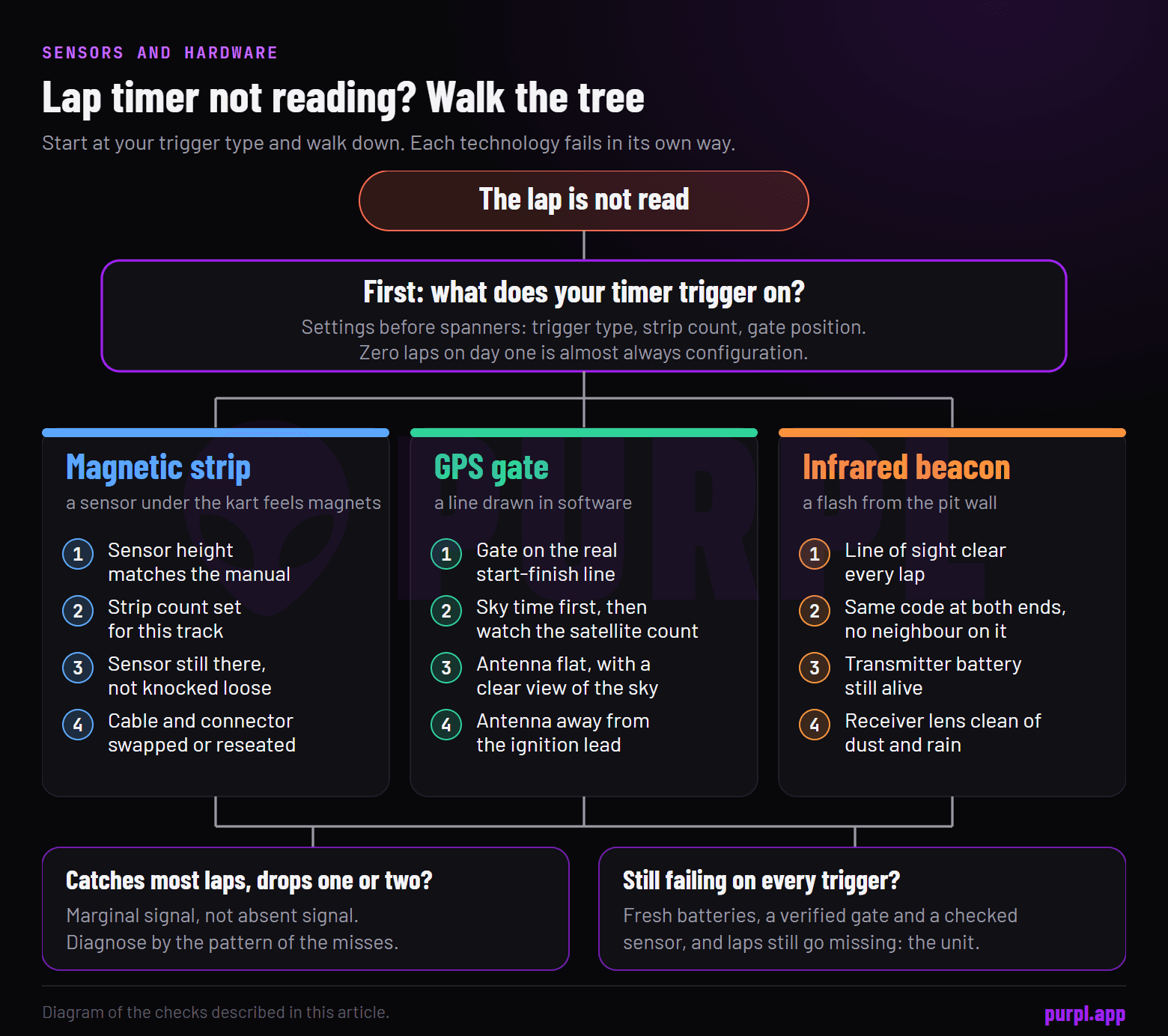
First: know what your timer triggers on
Every fix below depends on this one fact, and plenty of drivers genuinely don't know it.
Your dash starts a lap from one of three signals: a magnetic strip under the tarmac, an infrared beacon at the pit wall, or a GPS gate drawn in software. Many loggers support all three and are set to one. Find that setting before touching anything physical, with the technology tour in how lap timers work if the menu reads like alphabet soup.
Wrong trigger selected for the track you're at is the single most common cause of zero laps. A timer waiting for a beacon at a strip-only track waits forever.
Not sure what any of this hardware feeds into? The bigger picture of what a logger records sits in the karting telemetry guide. This article only cares about the one moment a lap starts.
Magnetic strip problems: height, config, damage
Strip timing fails physically, which makes it the easiest to fix.
Check the sensor height first. The pickup hangs under the floor tray and must sit at the manual's specified distance from the ground.
A sensor pushed up by a kerb strike, or hung high during a chassis change, stops feeling the field. Check it's still there at all, low-hanging sensors lead short lives. Mounting decides signal here, the same rule that runs through kart sensors explained.
Then check the track configuration. Some circuits have two or three strips, and your timer needs the right strip count set or it will read doubled or halved lap times. Ask the office how many strips the track runs; it's a normal question.
Still nothing with good height and config? Swap or reseat the sensor cable, the connector is the next suspect, per the wiring rules in the installation guide.
GPS problems: gate, sky, signal
GPS timing fails invisibly, so work from software outward.
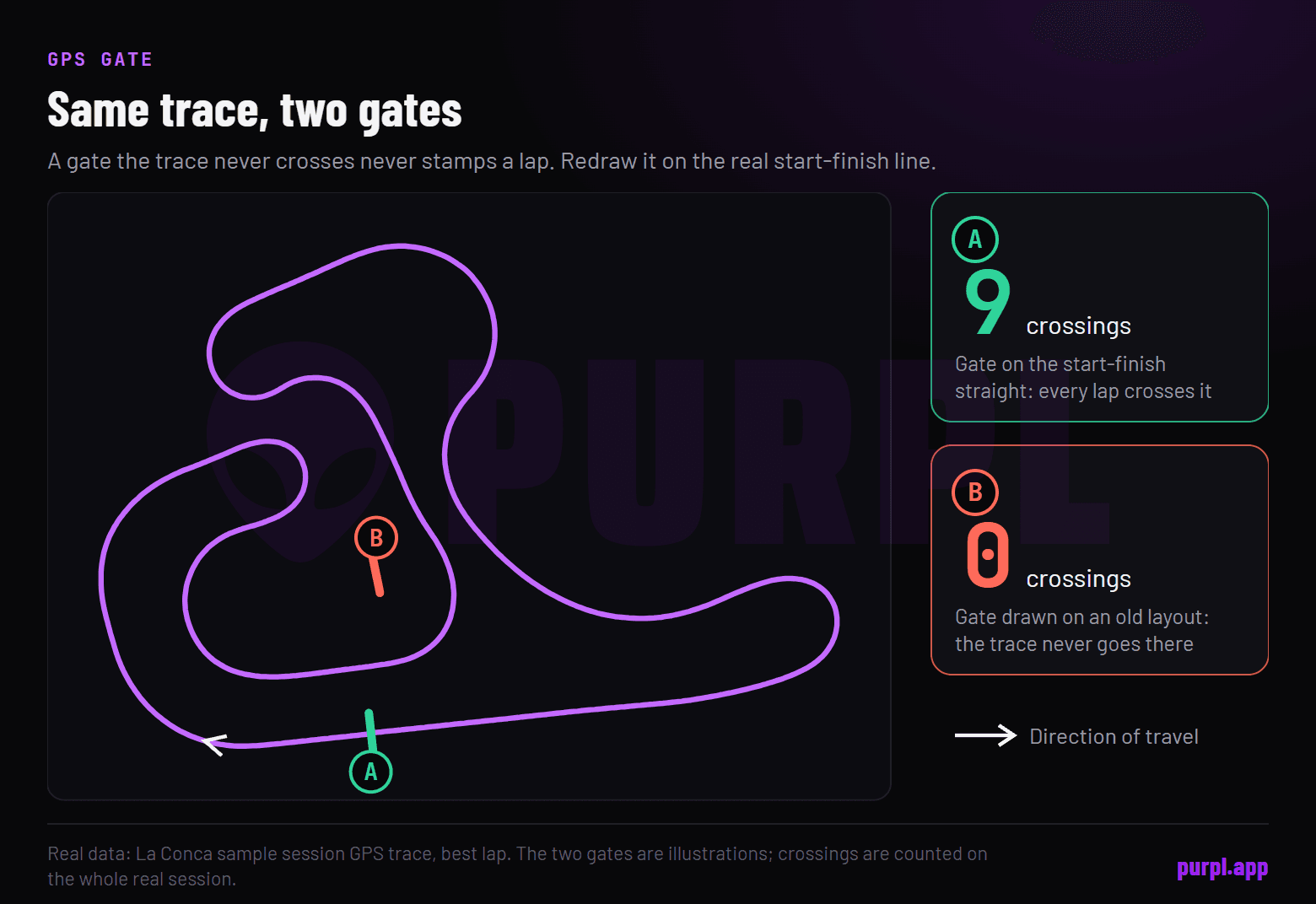
Check the gate first. A start-finish line drawn in the wrong place, on an old track layout, or imported for the wrong circuit means your trace never crosses it. Redraw it on the actual start-finish straight and most "broken" GPS timers are cured on the spot.
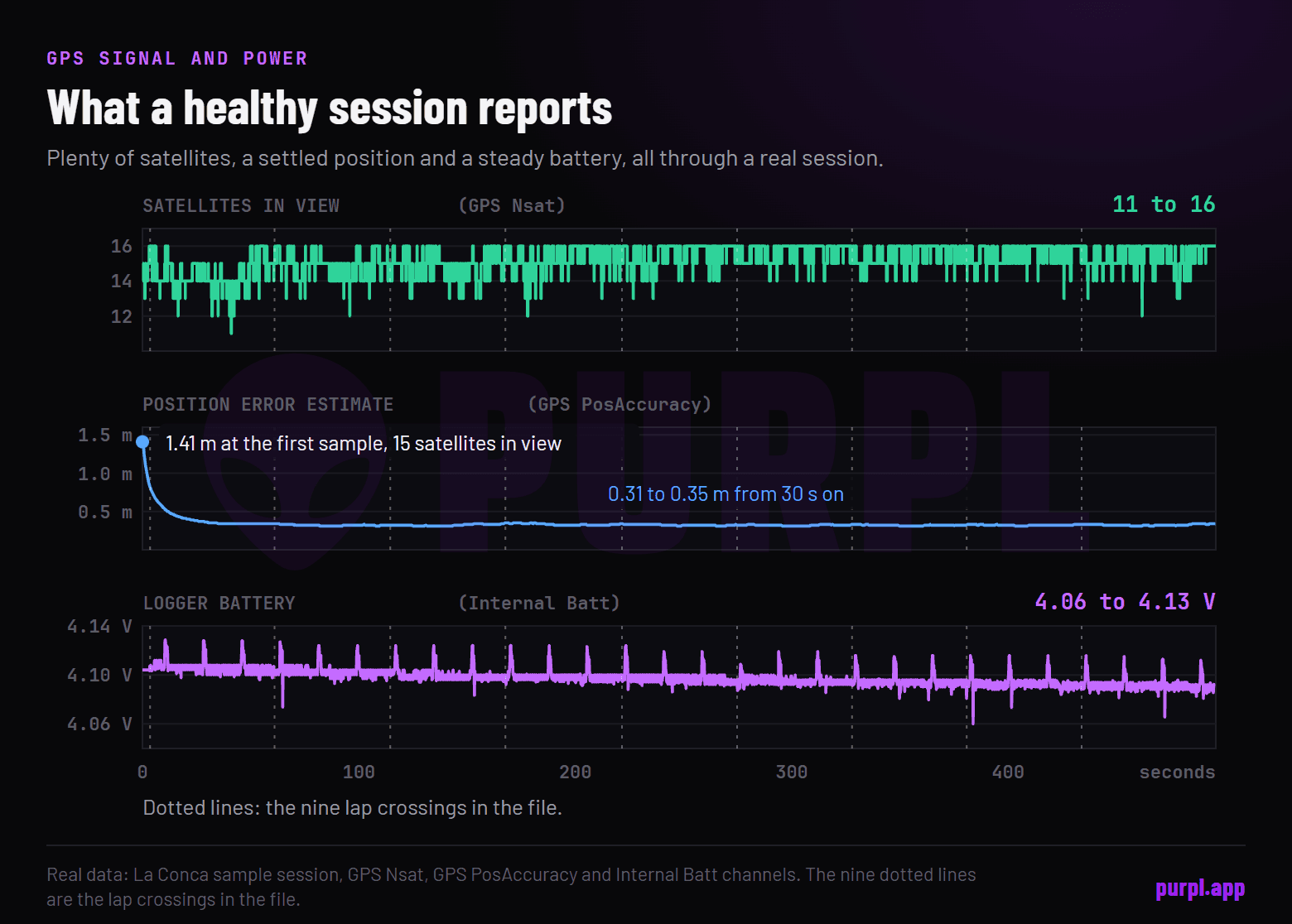
Then the signal. Cold starts need a minute or two of open sky before the first session. A unit switched on in the trailer and rushed to the grid starts blind.
Watch the satellite count on the dash where available, and remember roofs, trees and grandstands all degrade the fix, the physics from GPS accuracy.
Persistent weak signal with good sky usually means the antenna: shadowed by the driver, knocked off its flat angle, or routed near the ignition lead. Indoor karting, of course, has no GPS at all, venue transponders carry the timing there, as the KartPulse indoor timing thread walks through.
Beacon problems: sight, channel, neighbours
Infrared fails socially. Almost every beacon problem is about what's between the flash and the eye.
Line of sight first: the transmitter must see your receiver every lap, so move it clear of parked karts, mechanics and signboards. Channel second: receiver and transmitter must agree on the code, and two teams flashing the same channel at the same wall hand everyone creative lap times. Battery third, beacons die quietly mid-session.
And check the eye itself. A receiver lens caked in rubber dust or rain spots misses flashes intermittently, which produces the most maddening symptom of all: laps that mostly read.
Shared paddocks add a layer of manners. One beacon per team at the wall, each on its own channel, is the convention, because three transmitters stacked in the same spot turn everybody's data to soup.
So before blaming your receiver, walk the pit wall. Count the beacons, ask whose they are, and agree channels like grown-ups. Two minutes of talking saves three ruined sessions.
The intermittent miss: the hardest case
This one wears people down.
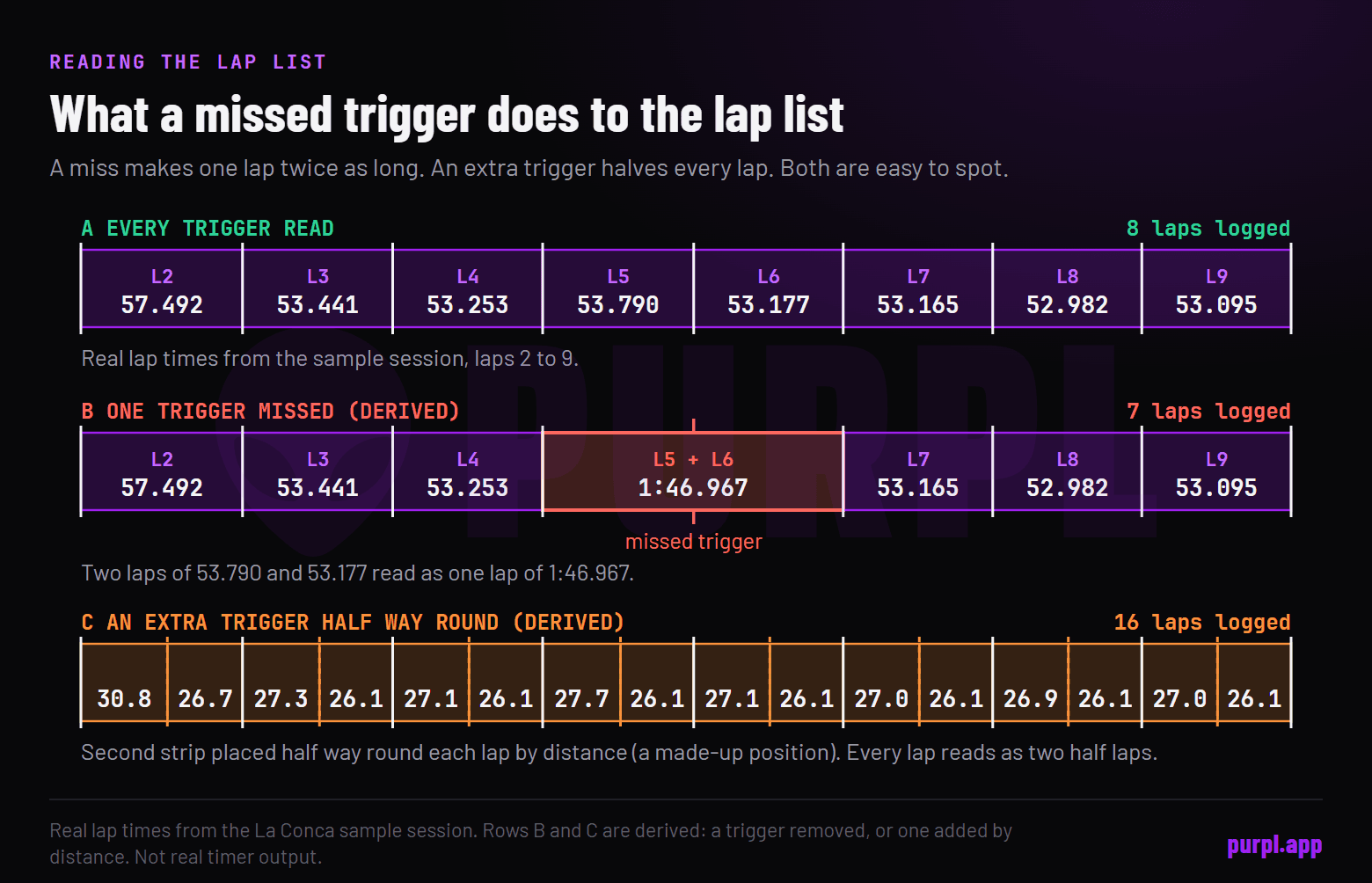
A timer that catches most laps but drops one or two is telling you the signal is marginal, not absent.
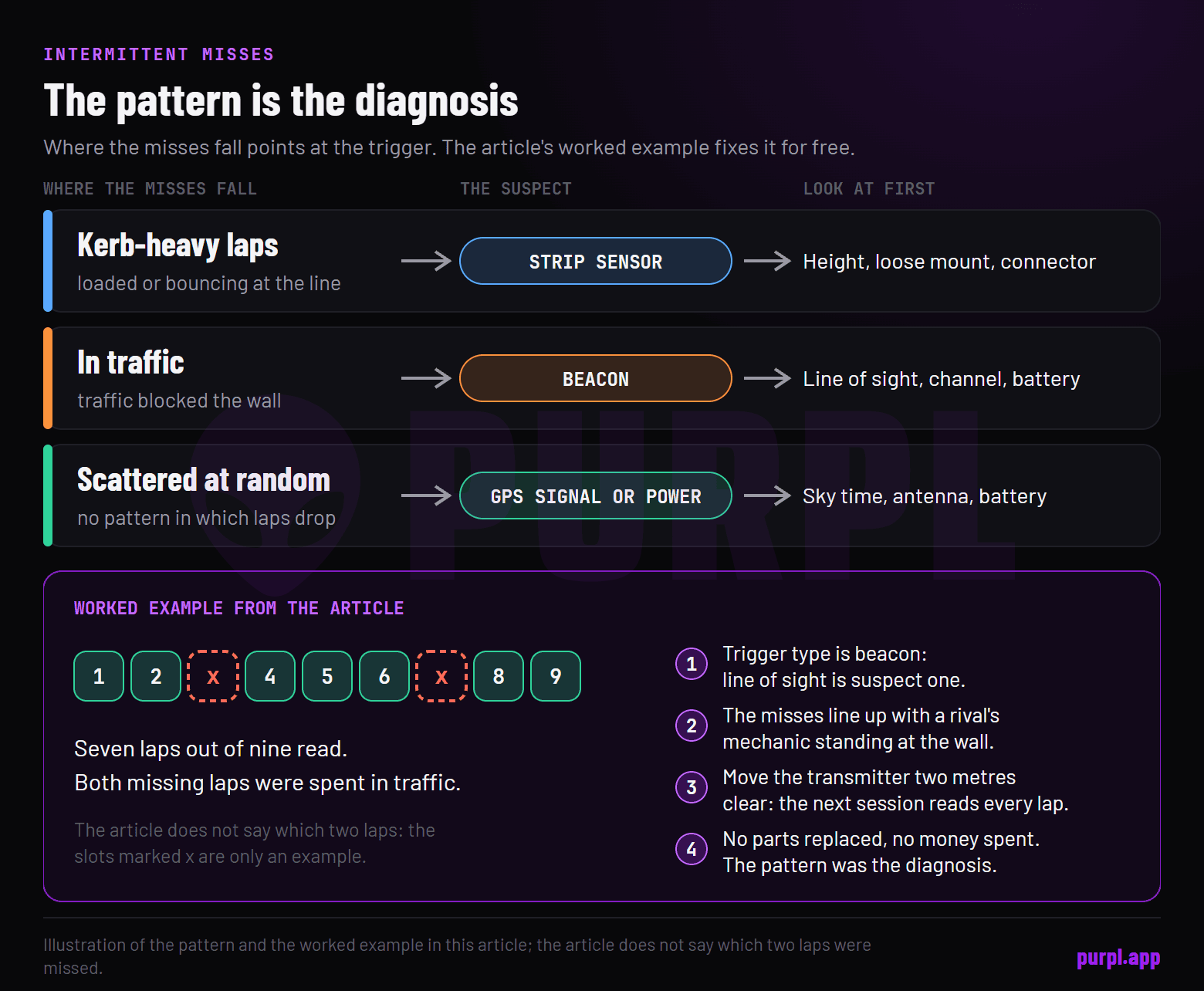
Marginal strip height reads the field on smooth crossings and misses when the kart is loaded or bouncing. Marginal GPS drops the gate crossing when the fix degrades mid-lap. Marginal beacon sight loses exactly the laps when traffic blocked the wall.
So diagnose intermittents by pattern. Misses on kerb-heavy laps point at the strip sensor. Misses in traffic point at the beacon.
Misses scattered randomly point at GPS signal or power, and power means the battery conversation in battery care.
A voltage sagging under load resets units mid-lap, eats the occasional lap, and tests fine on the bench afterwards. Batteries are the last suspect everyone checks and the first thing everyone should.
A worked example makes the tree concrete. Say a kart logs seven laps out of nine, and the two missing laps were both spent fighting through traffic. That pattern points at the beacon, not the unit.
Walk the tree: trigger type is beacon, so line of sight is suspect one. The two missed laps line up with moments a rival's mechanic stood at the wall. Move the transmitter two metres clear, and the next session reads every lap.
No parts replaced, no money spent. The pattern was the diagnosis. Plain and simple.
The five-minute pre-session insurance
Most missed laps are preventable with a routine shorter than a coffee.
Power on early, outside, so GPS gets its sky time. Glance at the trigger setting against today's track. Confirm the strip sensor survived yesterday's kerbs.
Check the battery level honestly instead of hopefully. Then go drive.
Teams that run this check simply stop having timing mysteries. The habit folds into the same pre-session minute as the mount and wiring glance from the install routine. Five minutes, zero mysteries.
Cheap trade. And do the checks in the same order every time, because routines survive race-day stress and decisions don't.
When it's genuinely the unit
Sometimes the tree ends at the box, and it's worth knowing the signs honestly.
A logger that misses laps across multiple trigger types, after fresh batteries, a verified gate and a checked sensor, has earned a service call. So has one that resets itself, loses its settings, or shows corruption in the downloads. Hardware does eventually die, especially hardware that lives on a kart.
Before that call, get the evidence in order. Support can only work with what you bring.
Have the firmware version written down, plus the trigger type you run and the exact symptom pattern: every lap, some laps, or only one track. Bring two or three downloaded sessions that show the problem. "It sometimes misses laps" is a shrug; files are a case.
And say what you've already ruled out, because a caller who has checked height, gate, channel and battery skips straight past the script and gets a real answer.
Before paying for repair on an old unit, run the upgrade math from kart data loggers explained. Sometimes the fix costs more than the used market's next logger, and the data layer you'd gain comes free with the maths.
FAQ
Why is my lap timer not reading any laps at all?
Zero laps is almost always configuration: wrong trigger type selected for the track, wrong strip count, or a GPS gate drawn somewhere your trace never goes. Hardware failures usually degrade gradually; total silence on day one points at settings.
So before reaching for tools, open the settings menu. Trigger type, strip count, gate position: three lines on a screen revive most "dead" timers. Settings before spanners.
Why does my timer read double laps?
Strip timing at a multi-strip track with the count set to one: every strip triggers a "lap". Set the correct strip count for the circuit, or in GPS timing, check you haven't drawn two gates. The half-length lap times are the giveaway.
Halved times tell the same story in reverse: the count is set higher than the strips the track actually has, so the timer waits for a strip that never comes.
Why are my GPS lap times missing only sometimes?
Marginal signal. Cold start without sky time, an antenna shadowed at speed, or local obstructions degrading the fix on part of the lap. Power the unit early, fix the antenna's sky view, and the intermittents usually vanish.
If sky time and antenna are already right, note which laps drop for a day. The places the misses cluster usually name the obstruction for you.
My timer works at home track but not elsewhere. Why?
Configuration travelled, the track didn't. Different strip counts, a gate drawn for the old circuit, or a beacon channel clash with a local team. Re-check trigger settings as part of arriving anywhere new; it's a thirty-second habit.
Beacon channels deserve extra suspicion away from home. The channel that was yours all season may already be taken at the new wall.
Alessio Lorandi started karting at six and won the 2013 CIK-FIA Karting World Championship. He raced through Formula 3, GP3 and Formula 2 before founding Purpl, an AI data coach for karting drivers.